You are here: PSPad forum > Bug report / Hlášení chyb > New context menue behaviour
New context menue behaviour
#1 New context menue behaviour
Posted by: LouCypher | Date: 2026-10-06 06:50 | IP: IP Logged
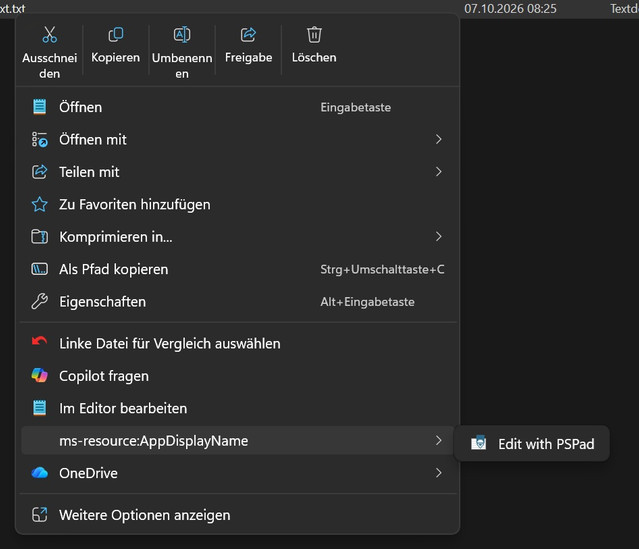
Hi, I've updated the context menue plugin as described with latest devdrop 875 which required 2 reboots (1st to allow a replacement of the old context menue dll and 2nd to activate the new one). The result is an entry in the first level of the context menue with the name "ms-resource:AppDisplayName >" with a submenue "Edit with PSPad".
Is this intended this way (OS is Windows 11 26H2)?
#2 Re: New context menue behaviour
Posted by: pspad | Date: 2026-10-06 07:29 | IP: IP Logged
Hello
There is no necessary any reboot. Who asked you for reboot? System?
In Win 11 25h2 there are items right in the context menu.
In the 26h2, there is new menu item "App extension" and all applications registration ends there.
In 26h2 old context content available under menu item "Show other options" is hidden as default and you have to enable it in the settings.
#3 Re: New context menue behaviour
Posted by: LouCypher | Date: 2026-10-06 15:27 | IP: IP Logged
Without reboot "pspshellx64.dll" was locked by OS even after changing to registry based context menue and closing PSPad. After replacing "pspshellx64.dll" there was no change in context menue without 2nd reboot even after switching back to dll based context menue.
But I didn't complained about required or not required reboots. I wondered about the weird name and structure of the new context meue entry.
#4 Re: New context menue behaviour
Posted by: pspad | Date: 2026-10-06 15:57 | IP: IP Logged
In case you install PSpad, you have to unregister it in elevated mode (run PSPad as admin)
or in CMD as admin run command:
regsrv32 -u path\pspshellx64.dll
Regarding the new structure. It's MS idea, not my idea. Each application has one entry. So there can be Open in PSPad without possibility to open in HEX mode or directly compare, if you select 2 files. So it's submenu.
In Win 26h2 it's worse, cause there is one level more - App extension -> PSPad -> PSPad items
#5 Re: New context menue behaviour
Posted by: LouCypher | Date: 2026-10-07 08:42 | IP: IP Logged
Sorry for being not precise enough, I know this. To appear in the context menue on first level Windows 11 requires a menue extension as a dll which PSPad provides and it works almost. My question is only if it is intended that the name of the new 1st level PSPad menue entry which appears within the context menue is "ms-resource:AppResourceName" and nothing with "PSPad". At least this is the case on my system after following the install instruction within the prerelease notes.
#6 Re: New context menue behaviour
Posted by: pspad | Date: 2026-10-07 11:48 | IP: IP Logged
Windows 10 allowed direct integration in context menu via DLL or registry
Windows 11 up to 25h2 hides it under Show other options. But you can integrate application directly into context menu using msix package (last PSpad build). But one entry only for application
Windows 11 26h2 hides "Show other options" - you have to enable it in the settings. Direct context menu integration using MSIX package was moved in 26h2 under system item "App extensions".
If any file extension is registered to PSPad, when you show context menu, you see PSPad icon + menu item name "Open". This is a system behavior, I have no influence of it.
#7 Re: New context menue behaviour
Posted by: LouCypher | Date: 2026-10-07 14:15 | IP: IP Logged
Maybe a screenshot makes it more clear, what I mean:
#8 Re: New context menue behaviour
Posted by: pspad | Date: 2026-10-07 14:48 | IP: IP Logged
I see. There is something wrong.
create BAT (or CMD) in the PSpad folder (or modify path for the pspshellx64.dll):
REM release PSPad shell extension registration
REM run CMD as administrator
powershell -NoProfile -Command "Get-AppxPackage -Name JanFiala.PSPad | Remove-AppxPackage"
C:\Windows\System32\regsvr32.exe /u /s %~dp0pspshellx64.dll
taskkill /F /IM dllhost.exe
taskkill /F /IM explorer.exe
start explorer.exe
This should remove context menu integration
Better will be wait for this weekends build and use fresh MSIX package
Use register PSpad DLL integration from the Program settings / System integration
#9 Re: New context menue behaviour
Posted by: LouCypher | Date: 2026-10-08 15:51 | IP: IP Logged
Many thanks for the undo instruction. But I don't care about temporary fuzzy context menue entries and am very thankful for the attempt to provide PSPad in the 1st level of the Windows 11 context menue which I know is a pain in the ass. So I have no problem to wait for the next full release with proper integration via the install process. I just wanted to give a hint that there might be a problem regarding this integration and a possible glitch when switching between registry and plugin integration via the settings.
#10 Re: New context menue behaviour
Posted by: LouCypher | Date: 2026-10-12 13:19 | IP: IP Logged
A quick update: With the registration mechanism of the latest dev drop the context menue looks fine now. I just copied pspshellx64.dll and pspshellx.msix to the PSPad program folder and adapted the provided registration script accordingly.
One minor note: It would be great if the PSPad icon could be displayed also in the 1st level context menu entry and not only for the corresponding submenue entries.
Editor PSPad - freeware editor, © 2001 - 2026 Jan Fiala, Hosted by Webhosting TOJEONO.CZ, design by WebDesign PAY & SOFT, code Petr Dvořák, Privacy policy and GDPR