You are here: PSPad forum > English discussion forum > Tabs caption
Tabs caption
#1 Tabs caption
Posted by: Alain75 | Date: 2026-09-01 10:56 | IP: IP Logged
I understand that tab numbering is related to «alt+n» and so, that numbers are only added to first 9 tabs unfortunately.
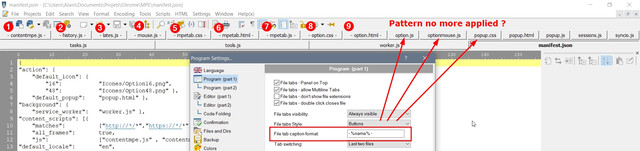
But even with using "- %name% -" as tab caption, this pattern is only applied to the first 9 tabs (mainly on the first line of tabs), leaving the second line of tabs with giant captions as I used many sessions with many files...
Could it be possible to extend the pattern to all tabs and not only the first 9 ? It would be very prettier 
Thanks a lot !!!
#2 Re: Tabs caption
Posted by: pspad | Date: 2026-09-01 11:15 | IP: IP Logged
Can you send me screenshot please?
Pattern should be applied to all tab captions.
On the second line is possible that caption looks "huge" cause size is aligned to whole width. It's driven by system component behavior. When you open another files, the second line captions width is decreasing.
#3 Re: Tabs caption
Posted by: Alain75 | Date: 2026-09-01 21:40 | IP: IP Logged
Hi Jan
Here is a screenshot of one of my "big" sessions :

Edited 1 time(s). Last edit at 2026-09-01 21:42 by Alain75.
#4 Re: Tabs caption
Posted by: pspad | Date: 2026-09-02 04:32 | IP: IP Logged
Hello
This is exactly what I described in my previous answer.
Second line takes whole line of tabs, even there are 3 files only when you open another files, width of the tabs will decrease.
It's windows control behavior.
#5 Re: Tabs caption
Posted by: Alain75 | Date: 2026-09-02 22:33 | IP: IP Logged
Okay but the pattern is unfortunately applied only to the first 9 tabs. Couldn't it be applied to all tabs when it doesn't contains "%n%" ?
#6 Re: Tabs caption
Posted by: pspad | Date: 2026-09-03 15:27 | IP: IP Logged
I limited length of file name to 4 chars - %d:4
As you can see, mask is applied on all tabs, include unnumbered
#7 Re: Tabs caption
Posted by: Alain75 | Date: 2026-09-03 18:17 | IP: IP Logged
Hi
I think that we misunderstand each other. I don't use the pattern %d but juste %name% with dashes before and after to enlarge all captions. But the pattern is only applied to the first 9 tabs as you can see :
#8 Re: Tabs caption
Posted by: pspad | Date: 2026-09-03 19:23 | IP: IP Logged
There is only 9 numbered tabs you can quick access with shortcut. There is no possible to use shortcut e.g. ctrl+10
This is the reason, why pspad shows numbers for first 9 tabs only
#9 Re: Tabs caption
Posted by: Alain75 | Date: 2026-09-04 09:40 | IP: IP Logged
I dont use quick access with shortcut for tabs. May I understand that the pattern for tabs is only used for shortcut and so to only first 9 tabs ?
In that case, could it be an option to apply the pattern to all tabs ?
Thanks
#10 Re: Tabs caption
Posted by: pspad | Date: 2026-09-04 09:48 | IP: IP Logged
What for are the numbers then? Why to have numbered tabs?
If you want to remove numbers from all tabs, let there %name% only, remove %n% from the begin
Editor PSPad - freeware editor, © 2001 - 2026 Jan Fiala, Hosted by Webhosting TOJEONO.CZ, design by WebDesign PAY & SOFT, code Petr Dvořák, Privacy policy and GDPR